Klondike Solitaire Large Cards delivers a faithful rendition of the classic solitaire experience with a practical upgrade. The larger card faces make it easy to read, reducing eye strain during long sessions. The clean, soothing design and intuitive controls create a relaxing atmosphere. It's free, accessible on any device, and perfect for both quick breaks and extended play. A must-try for solitaire enthusiasts.
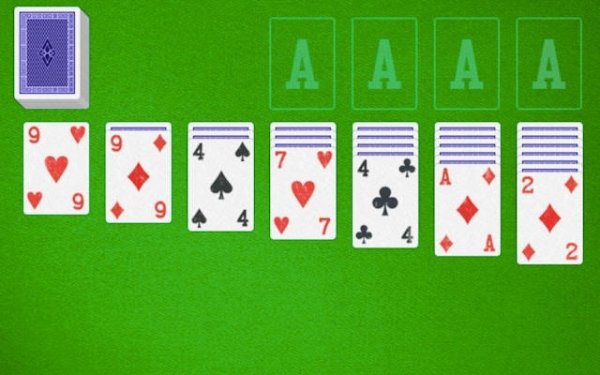
Klondike Solitaire Large Cards is a classic card game that offers a timeless experience with a practical twist. The core objective is to arrange all cards into four foundation piles, each built from Ace to King by suit. This version stands out by featuring larger card faces, making it easier to read and play, especially for those who prefer a clear and comfortable view. The game follows traditional Klondike rules faithfully, providing a familiar challenge for seasoned players while remaining accessible to newcomers. Designed for both quick sessions and longer play, it fits seamlessly into any schedule. The clean and soothing design enhances focus, allowing players to enjoy the strategic depth of solitaire without distractions. Whether you have a few minutes or an hour, Klondike Solitaire Large Cards offers a relaxing yet engaging puzzle that tests planning and pattern recognition. Its simplicity and elegance make it a perfect choice for anyone seeking a calm, rewarding card game experience.
Players build four foundation piles, one for each suit, starting with the Ace and progressing up to the King. The seven tableau columns are used to create descending sequences of cards in alternating colors. The top card of any tableau column can be moved to another column or directly to a foundation pile. When a face-down card is revealed by moving the top card, it becomes available for play. If no moves are available on the tableau, players draw cards from the stock pile to find new options. The game ends successfully when all cards are moved to the foundation piles. The interface is intuitive, with simple click or tap actions to select and move cards, making it easy for players of all skill levels to pick up and play.
Features include large, legible cards that are easy to read, reducing eye strain during extended play. The design is clean and soothing, with a user-friendly interface that prioritizes clarity. The game follows classic Klondike rules faithfully, ensuring an authentic solitaire experience. It is completely free to play and accessible on any device, including desktops, tablets, and phones. Controls are intuitive, allowing players to focus on strategy rather than complex commands. The game may also include options to customize the card design or background for a personalized touch. These features combine to create a relaxing and enjoyable puzzle experience for players of all ages.
Focus on revealing face-down cards in the tableau early to unlock more moves and increase your options. Try to build foundation piles evenly across suits when possible, as this can prevent bottlenecks later. Use the stock pile wisely, and avoid moving cards unnecessarily, as each move should have a clear purpose. Practice regularly to improve pattern recognition and planning speed, which are key to mastering the game. With patience and thoughtful play, you can consistently complete the puzzle.







Player Comments
Sign in to comment
You must be logged in before posting a review or rating.
No account? Create one
No comments yet. Be the first to comment!