Spider Two Suits Solitaire offers a satisfying challenge for card game fans. The two-suit requirement forces careful planning and sequence management, increasing replayability. The interface is clean and intuitive, with smooth animations. Unlimited undo helps players learn without frustration. Each game feels fresh due to random shuffling. It is a great choice for mental exercise during breaks or longer sessions.
Spider Two Suits Solitaire is a challenging card game that builds on the classic Spider Solitaire format. It uses two standard decks totaling 104 cards, with 52 Hearts and 52 Spades. The goal is to arrange all cards in descending order from King to Ace within the tableau. This version demands more skill and focus than single-suit variants, providing hours of mental stimulation. Players of all ages can enjoy the strategic depth and satisfying challenge of completing each game.
To play, shuffle two decks together. Deal ten piles of cards, each with four face-down and one face-up card, forming the tableau. Place remaining cards face-down as the stockpile. Move cards between tableau piles in descending order regardless of suit. However, you can only move a sequence of cards if they are the same suit. Fill empty tableau piles with any card or sequence. When stuck, deal more cards from the stockpile by clicking it. Uncover face-down cards to create more moves. Continue until all cards are arranged in descending King to Ace order within their suits to win.
Strategy and careful planning are required. The game features a clean interface and smooth gameplay. It offers unlimited undo options to help players learn from mistakes. The stockpile provides additional cards when moves are blocked. Each game is randomly shuffled for fresh challenges.
Focus on uncovering face-down cards early to open up more moves. Prioritize building same-suit sequences to allow easier movement. Use empty tableau piles strategically to reorganize cards. Plan several moves ahead and use the undo feature to explore different strategies. Practice regularly to improve your pattern recognition and decision-making skills.

Clean design and smooth gameplay. Great for short breaks and quick mental challenges.
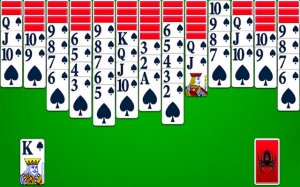
Clean design and smooth gameplay. Great for short breaks or extended play sessions.
Clean design and smooth gameplay. Great for short breaks. Easy to learn but offers strategic depth.
Clean design and smooth gameplay. Great for short breaks and memory training.
Clean design and smooth gameplay. Great for short breaks.
Clean design and smooth gameplay. Great for short breaks or longer sessions.
Clear, large cards and smooth gameplay. Perfect for relaxing breaks or daily brain training.
A thoughtful and rewarding solitaire variant. Clean design and smooth gameplay make it ideal for puzzle fans.